Description
Simple Sign In/Sign Up Screens Sketch Resource
✨ iOS App – Sign In / Sign Up UI (Sketch Design)
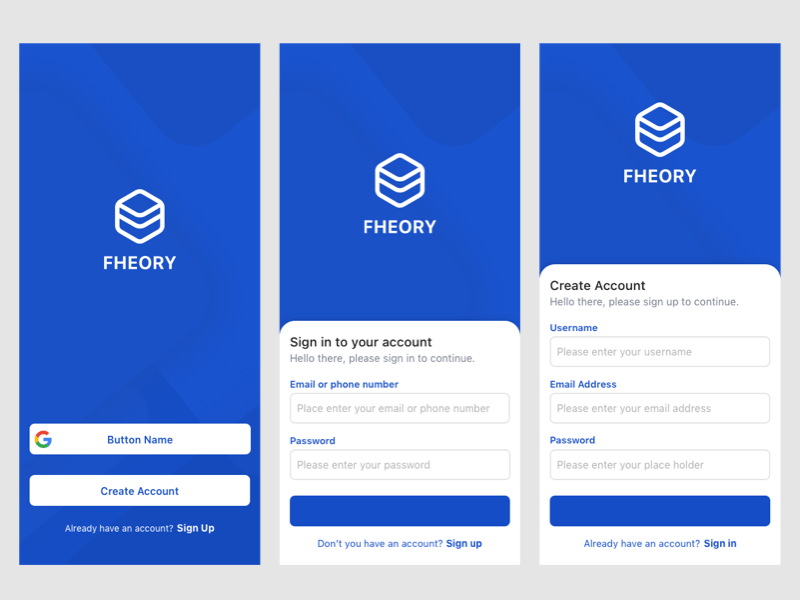
This Sketch-based UI design presents a clean, intuitive, and modern interface for user authentication in an iOS app. The screen features a dual-purpose layout that seamlessly toggles between Sign In and Sign Up modes, ensuring a smooth onboarding experience.
🔹 Key Design Elements:
- Minimalist Aesthetic: Soft color palette with ample white space for clarity and focus.
- Input Fields: Rounded text fields for email, password, and username (in Sign Up mode), with subtle shadows and clear labels.
- Primary CTA Buttons: Bold, gradient-filled buttons for “Sign In” and “Create Account”, designed for high visibility and easy tap targets.
- Social Login Options: Optional buttons for signing in via Apple, Google, or Facebook, styled with brand-consistent icons.
- Error Handling & Validation: Inline error messages and field highlights to guide users through correct input.
- Responsive Layout: Optimized for various iPhone screen sizes, with adaptive spacing and alignment.
🧩 UX Highlights:
- Smooth transition animations between Sign In and Sign Up states.
- Clear hierarchy and typography for effortless navigation.
- Accessibility-friendly contrast and touch targets.
This UI design is ideal for apps focused on productivity, lifestyle, or social engagement, and can be easily extended to include multi-factor authentication or password recovery flows.
Reviews
There are no reviews yet.